


RingCentral
4.82.53K Reviews
App Specs
- Version
- 26.3.10.480649
- Updated On
- License
- Free
- Downloads
- 1,000,000+
- Developer
- RingCentral
- Categories
- Business
- Platform
- Android, iOS
Screenshots


 Analysis by AppCompare
I judge a business communications app less by how many tools it puts on one screen and more by whether it helps a team stay reachable without making everyday work harder. RingCentral aims to bring calls, messages, and meetings together, which can be convenient when a workplace already uses its service. The main question is whether that combined setup fits your team’s habits, not whether one app can replace every tool you use.
Where setup and sign-in can become confusing
The first point to check is whether your organization already has a RingCentral account and the right sign-in details. This is a work service, so downloading the app alone may not be enough to get you into your company’s calling and collaboration setup. If you are installing it for personal use without an organization or service arrangement in mind, pause and check what access you expect before building your workflow around it.
When sign-in fails, I would first verify the account details and make sure I am using the correct work identity rather than another email address. If your organization manages access, its administrator or internal support contact is the sensible next stop. Repeatedly reinstalling the app is unlikely to fix an account-access issue, and it can add extra steps without clarifying what went wrong.
Small checks that make the first session smoother
Before relying on the app for an important call, I would open it while connected to the network I plan to use and confirm that I can reach the relevant parts of my work account. Check that the phone itself is not in a mode that silences calls or notifications, and review the app’s available settings if alerts are not appearing as expected. Menu names and options can vary, so it is better to follow what your installed version actually shows instead of assuming a particular setting is present.
I would also test the full path you intend to use: place or receive a call, open the conversation you need, and join a meeting before the moment becomes urgent. That quick rehearsal can reveal a wrong account, a muted device, or a network problem while there is still time to switch to another way of contacting someone. For work that depends on being reachable, a backup contact method is practical rather than pessimistic.
Recovering a workflow without making a bigger mess
If a call or meeting does not connect, I try one change at a time. Check whether the connection is stable, confirm the person or meeting details, and then retry. Switching between Wi-Fi and mobile data may help distinguish a local network issue from an account or service issue, but it is not a guaranteed fix. If messaging still works while calling does not, that difference is useful information to share with your workplace support team.
For a missed conversation, look at the relevant call history or voicemail area, then use a message to close the loop if that is appropriate. I would avoid assuming that a message, missed call, and voicemail all create the same kind of follow-up: they serve different purposes, and the other person may not see them at the same time. A short note saying what action you need is often more useful than sending the same update through every channel.
Worth Reading Before You Choose

EA SPORTS FC Mobile 26 Is a Bigger Football Game, but It Takes Time

Flipboard Shows What News Apps Must Do Beyond the Feed

Switching to Android Auto Means Rethinking Your Driving Routine

Google Calendar Makes a Crowded Week Easier to Manage

Ludo King Makes the Most of the Minutes Between Plans

Baby Panda World Brings Quick Play to Modern Phones, but Its Game Library Feels Busy
When the phone is not the cause
Not every interruption comes from the app. A weak connection, device settings, an outdated sign-in, or an organization-level account problem can all affect what you can do. If the same issue appears across more than one device, or several coworkers report it at once, that is a reason to ask your administrator or support contact to check the broader setup instead of treating it as an isolated phone fault.
Likewise, call quality depends on the conditions around a call, not just on the app’s interface. If audio becomes difficult to follow, move to a more stable connection if you can, close other demanding activity, and consider switching to a phone call or a message for the immediate exchange. For confidential work, follow your organization’s rules about approved devices and communication channels rather than assuming any convenient connection is suitable.
RingCentral is a business app developed by RingCentral. It is free to download, has an Everyone age rating, and has been available since March 5, 2014. Its current version is 26.2.20.320510, and it requires Android 8.0 or later. Its average rating is 4.7 from around 33,000 ratings, with about 2,500 written reviews and over 1 million installs. Those figures suggest broad use, but they do not tell you whether your organization’s setup will suit your particular needs.
Who benefits from keeping work in one place
I can see the appeal for a small team that handles customer calls, internal questions, and scheduled meetings throughout the day. Imagine a colleague calling while you are away from your desk: you can check the call history, respond with a quick message, and then join a planned discussion without jumping between unrelated work apps. The value is less about having every feature and more about reducing the small context switches that otherwise scatter conversations.
It is also a reasonable fit for people who move between a desk and a phone and want work communications to remain accessible in both settings. A freelancer working with a team that already uses RingCentral may appreciate having business conversations grouped with that team’s calling and meetings. By contrast, someone who only needs occasional one-to-one calls may find a simpler calling or messaging app easier to maintain.
How it compares with separate calling and chat tools
Compared with a setup built from a phone service, a separate team chat app, and a dedicated meeting tool, RingCentral’s strength is consolidation. Fewer separate apps can make it easier to find the right place to continue a work conversation. The trade-off is that consolidation works best when teammates actually use the same system and the organization has configured it well. If clients or coworkers insist on other platforms, you may still need those tools, so the app will not automatically remove every communication switch.
Standalone tools can be a better choice when your needs are narrow: a basic chat service for informal coordination, for example, or a meeting app chosen specifically for external calls. I would not move an entire team just because an all-in-one app sounds tidy. First map where calls, messages, and meetings currently happen, then decide whether bringing them closer together solves a real annoyance or merely creates another place everyone must check.
Making everyday use more deliberate
One useful habit is to decide what belongs in each channel. Use a call when a quick back-and-forth will resolve a question faster, a message when the information can wait, and a meeting when people need a shared discussion. This is not a special feature; it is a way to keep an all-in-one communications app from becoming an all-day stream of interruptions. If your team agrees on simple response expectations, missed messages are less likely to feel like missed calls.
For a busy day, I would also make a short routine of checking missed calls and messages at natural breaks rather than constantly reopening every section. When you pass a detail from a call into a team conversation, include enough context for someone who was not on the call to understand what is needed. That small step can prevent the same question from being repeated in a meeting later.
Before depending on a new integration or a screen-sharing workflow, try it in a low-stakes situation. Connections between work apps can be useful, but they do not remove the need to confirm that the right account and information are being used. A quick check before a customer meeting is a better time to discover a mismatch than the meeting itself.
If you are deciding whether to install it, the practical questions are straightforward: Does your workplace use RingCentral? Do you need its business calling and team communication in the same place? Can you access the account your organization expects you to use? If the answers are yes, trying the app is a sensible next step. If you are choosing a communication service for a whole organization, compare the setup and workflows with your existing tools before asking everyone to switch.
If you’ve been on the hunt for a seamless communication tool that combines calling, messaging, and video conferencing into one neat package, let me introduce you to RingCentral. I've spent some time tinkering around with this app, and here's the lowdown.
Getting Started with RingCentral
First things first, setting up RingCentral is a breeze. The app is available for both Android and iOS, which is super handy if you’re switching between devices. Once you've downloaded it, the installation process is straightforward. You'll need to create an account or sign in with existing credentials. Easy peasy.
The interface is clean and user-friendly. You won’t find yourself lost in a maze of buttons trying to figure out how to make a call or send a message. Everything is right where you’d expect it to be, making it super intuitive even for tech novices.
Features That Stand Out
What really hooked me on RingCentral is its all-in-one functionality. You get a virtual phone system, team messaging, and video conferencing all rolled into one app. No more juggling multiple apps for different tasks. One app, endless possibilities.
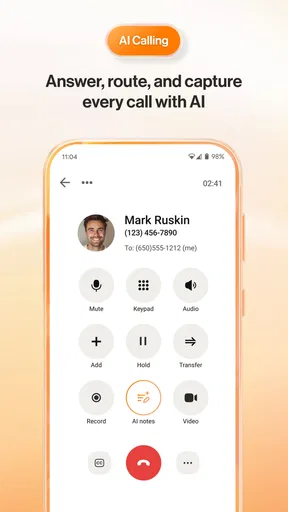
The calling feature is robust. You can make and receive calls from anywhere, and the call quality is pretty impressive. Whether you’re on Wi-Fi or mobile data, calls come through crystal clear. Plus, you can manage your voicemails and call logs with ease.
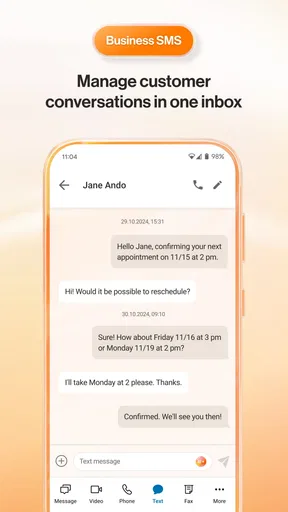
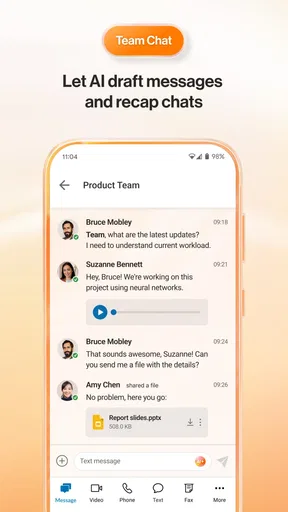
Messaging is another strong suit. You can create teams, start conversations, and even share files directly within the app. It's like having a mini office in your pocket. I found the messaging feature particularly useful for quick updates and sharing documents on the go.
Video conferencing is a breeze with RingCentral. You can host or join meetings with a few taps. The video quality is sharp, and there are features to share your screen, which is a lifesaver for presentations or collaborative work. Plus, you can record meetings, so you never miss a beat.
Integrations and Flexibility
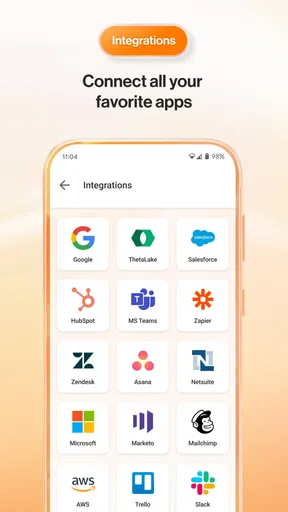
Another thing I love about RingCentral is its flexibility. It integrates seamlessly with other apps like Google Workspace, Microsoft 365, and Slack. This means you can keep your workflow smooth and uninterrupted. And if you’re a bit of a techie, you’ll appreciate the open API that allows for custom integrations.
RingCentral also offers a range of plans tailored to different needs. Whether you’re a small business owner or part of a large enterprise, there’s something for everyone. The flexibility in pricing is a nice touch, allowing you to scale as your business grows.
Security and Reliability
In today’s digital age, security is a big deal. RingCentral doesn’t skimp in this department. It boasts end-to-end encryption and other security measures to keep your communications safe. So, whether you’re discussing sensitive business deals or just catching up with a colleague, you can be sure your conversations are private.
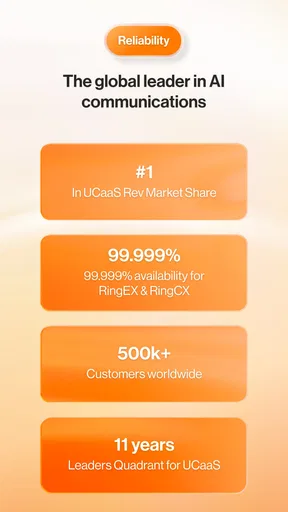
Reliability is another feather in its cap. The app runs smoothly, with minimal downtime. In all the time I used it, I didn’t encounter any major glitches or crashes. It’s nice to have an app you can rely on, especially when it comes to business communications.
Final Thoughts
So, is RingCentral worth a download? Absolutely. It’s a powerhouse of an app that makes communication and collaboration a breeze. From its user-friendly interface to its comprehensive features, it’s hard to find a flaw. Whether you’re a freelancer, a small business, or part of a large corporation, RingCentral has something to offer.
In a world where staying connected is more important than ever, having a reliable communication tool is key. And with RingCentral, you’ve got all your bases covered. Give it a whirl and see for yourself how it revolutionizes the way you work and communicate.
Pros
- User-friendly interface makes navigation easy.
- Offers seamless integration with other apps.
- High-quality voice and video calls.
- Reliable customer support available 24/7.
- Customizable settings for personalized use.
Cons
- Premium features require a subscription.
- Initial setup can be time-consuming.
- Occasional connectivity issues reported.
- Notifications can be overwhelming at times.
- Limited offline functionality available.
FAQs for RingCentral
What features does RingCentral offer for remote teams?
RingCentral provides a comprehensive suite of tools for remote teams, including video conferencing, team messaging, and cloud phone systems. It integrates seamlessly with popular apps like Slack and Microsoft Teams, allowing for smooth collaboration. Additionally, it offers screen sharing and task management features to enhance productivity and communication among team members.
Is RingCentral secure for business communications?
Yes, RingCentral places a strong emphasis on security. It employs end-to-end encryption for calls and messages, ensuring that all communications are protected. The platform complies with industry standards such as HIPAA and GDPR, providing businesses with the assurance that their data is handled with the utmost security and privacy.
How user-friendly is the RingCentral app for new users?
RingCentral is designed with user-friendliness in mind, featuring an intuitive interface that is easy for new users to navigate. The setup process is straightforward, and the app provides helpful tutorials and customer support to assist users in getting started. Its seamless integration capabilities also make it easier to adopt alongside existing tools.
What are the pricing options for RingCentral?
RingCentral offers various pricing plans to suit different business needs. These range from basic packages for small teams to more comprehensive plans for larger enterprises. Each plan provides a different set of features, and there are options to add specific functionalities as needed. A free trial is also available for businesses to explore the service before committing.
Can RingCentral be integrated with other business tools?
Yes, RingCentral offers robust integration options with a wide range of business tools. It supports integration with CRM systems like Salesforce, productivity apps like Google Workspace, and other collaboration platforms. These integrations allow businesses to streamline their workflows and improve efficiency by connecting all necessary tools within a single platform.


